
Hi there! this is super fast tutorial, when I was take a rest at the room. Oh god, where is my cofee and PUNK music. Aha!
This tutorial will show to you, how to create Interactive and very fast data management on one page together, without refreshing any page. One thing make this better “You are in codeigniter class of dr.emi” So, enjoy this tutorial.
First, we need some ammunition:
1. Codeigniter framework
2. jQuery framework
3. Netbeans IDE
4. Colorbox jQuery plugin
Part #1 Create database
CREATE TABLE `blog` (
`id` int(11) NOT NULL auto_increment,
`title` varchar(255) NOT NULL,
`content` text NOT NULL,
`date` datetime NOT NULL,
PRIMARY KEY (`id`)
) AUTO_INCREMENT=1;
Part #2 Codeigniter configuration
Open your base configuration and database configuration on folder ./application/config/
>>> autoload.php
$autoload['libraries'] = array('database');
$autoload['helper'] = array('html', 'url', 'form', 'template');
$autoload['model'] = array('Blog_model');
>>> database.php
$active_group = 'default';
$active_record = TRUE;
$db['default']['hostname'] = 'localhost';
$db['default']['username'] = 'root';
$db['default']['password'] = 'dremi_still_here';
$db['default']['database'] = 'interactive_ajax_data_management';
Part #3 Create Blog Controller
Create new class file on ./application/controllers/ and save as blog.php
<?php if ( ! defined('BASEPATH')) exit('No direct script access allowed');
/**
* Description of blog controller
*
* @author dr.emi
*/
class Blog extends CI_Controller {
function Blog() {
parent::__construct();
}
function index() {
$data = array(
'query' => $this->Blog_model->get_last_ten_entries()
);
$this->load->view('blog/index', $data);
}
function entries() {
$data = array(
'query' => $this->Blog_model->get_last_ten_entries()
);
$this->load->view('blog/entries', $data);
}
function form() {
$data = $this->Blog_model->current_entry();
$this->load->view('blog/form', $data);
}
function save() {
$this->Blog_model->save_entry();
}
function confirm() {
$this->load->view('blog/confirm');
}
function delete() {
$this->Blog_model->delete_entry();
}
}
Part #4 Create Blog Model
Create new class file on <strong>./application/models/</strong> and save as <strong>blog_model.php</strong>
[php]
<?php if ( ! defined('BASEPATH')) exit('No direct script access allowed');
/**
* Description of blog model
*
* @author dr.emi
*/
class Blog_model extends CI_Model {
function __construct() {
// Call the Model constructor
parent::__construct();
}
function get_last_ten_entries() {
$this->db->order_by("id", "desc");
$query = $this->db->get('blog', 10);
return $query;
}
function save_entry() {
$tabledata = get_table_fld('blog');
$data = post2data($tabledata);
$id = store_data('blog',$data,'id');
}
function delete_entry() {
$this->db->delete('blog', array('id' => $this->uri->segment(3)));
}
function current_entry() {
// Get Table Fields
$fields = get_table_fld('blog');
$data = make_array_key($fields);
$this->db->where('id', $this->uri->segment(3));
$sql = $this->db->get('blog');
$row = (array) $sql->row();
$data = array_merge($data, $row);
return $data;
}
}
Everything is fine, if you read codeigniter user guide. I just wanna tell you about the main concept on this tutorial. So, what the next?
Part #5 Create Template Helper
Create new class file on ./application/helpers/ and save as template_helper.php
<?php if ( ! defined('BASEPATH')) exit('No direct script access allowed');
/**
* @author dr.emi
* @copyright 2010
*/
function get_table_fld($table) {
$_this = & get_Instance();
$sql = "show columns from $table ";
$res = $_this->db->query($sql);
$rows = $res->result();
foreach($rows as $r){
$fld[] = $r->Field;
}
$fld = implode(';',$fld);
return ($fld);
}
function make_array_key($str) {
$ar = array();
$key = explode(';',$str);
foreach($key as $k){
$t = array($k=>'');
$ar = array_merge($ar,$t);
}
return $ar;
}
function post2data($str) {
$_this = & get_Instance();
$key = explode(';',$str);
foreach($key as $k){
if($_this->input->post($k)=='' ) continue;
$data[$k] = ltrim(rtrim($_this->input->post($k)));
}
return $data;
}
function store_data($table,& $data,$id) {
$_this = & get_Instance();
$result=0;
if($_this->input->post($id)==''){
if($_this->db->insert($table,$data)) {
//$data[$id] = mysql_insert_id();
$result = mysql_insert_id();
}
} else {
$_this->db->where($id,$_this->input->post($id));
if($_this->db->update($table,$data)) //update($table = '', $set = NULL, $where = NULL, $limit = NULL)
$result = $_this->input->post($id);
}
return $result;
}
Part #6 Create View of blog cotroller
==========MAIN CONCEPT==========
In this case, we will create it on new folder ./application/view/blog/
So, create all view into blog folder.
Then, we will load jQuery, colorbox, and a custom JS. Happy call the script!
<?php echo link_tag('public/css/style.css'); ?>
<?php echo link_tag('public/css/colorbox.css'); ?>
<script type="text/javascript" src="<?php echo base_url(); ?>public/js/jquery.js"></script>
<script type="text/javascript" src="<?php echo base_url(); ?>public/js/jquery.colorbox.js"></script>
<script type="text/javascript" src="<?php echo base_url(); ?>public/js/custom.js"></script>
Now, here is the main concept about the auto load dynamic content. We will open form, confirmation dialog, and action on one page without refresh current page. The strategy is: create two different ID on document as target. One as first init content, and the other as new content. When action is complete, we will reload the current content from entries.php file. We need, ajax jQuery here, and will show to you.
<div id="newEntries"><!--NEW CONTENT HERE, AS entries.php target--></div>
<div id="firstEntries"><!--FIRST CONTENT HERE--></div>
Remember, we have created function on blog controller class. So, use it! Here are the main function that will used on processing data.
function entries() >>> as result of table content
function form() >>> as colorbox pop up content while ajax request form.php view
function save() >>> as action while submit form, there are two condition: save new record and update new record
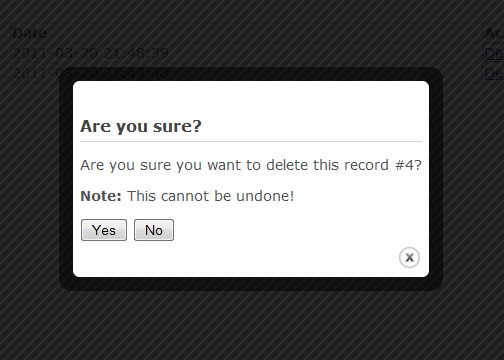
function confirm() >>> as colorbox pop up content while ajax request confirm.php view
function delete() >>> as action while delete record
Part #6.A Index.php view
<?php echo link_tag('public/css/style.css'); ?>
<?php echo link_tag('public/css/colorbox.css'); ?>
<script type="text/javascript" src="<?php echo base_url(); ?>public/js/jquery.js"></script>
<script type="text/javascript" src="<?php echo base_url(); ?>public/js/jquery.colorbox.js"></script>
<script type="text/javascript" src="<?php echo base_url(); ?>public/js/custom.js"></script>
<h1>Last 10 Entries</h1>
<a href="<?php echo site_url().'/blog/form'; ?>" return="<?php echo site_url().'/blog/entries'; ?>" id="popUpTrigger">Insert new record</a>
<div id="newEntries"></div>
<div id="firstEntries">
<table width="80%" cellpadding="1" cellspacing="1" bgcolor="#cecece" style="margin-top: 30px;">
<thead style="font-weight: bold;">
<tr bgcolor="#ffffff">
<td>#</td>
<td>Title</td>
<td>Date</td>
<td>Action</td>
</tr>
</thead>
<tbody>
<?php
if ($query->num_rows() > 0)
{
$i = 0;
foreach($query->result() as $row) { $i++;
?>
<tr bgcolor="#ffffff">
<td><?php echo $i; ?></td>
<td><a id="popUpEditFormTrigger" return="<?php echo site_url().'/blog/entries'; ?>" href="<?php echo site_url().'/blog/form/'.$row->id; ?>"><?php echo $row->title; ?></a></td>
<td><?php echo $row->date; ?></td>
<td><a id="popUpDeleteTrigger" return="<?php echo site_url().'/blog/entries'; ?>" href="<?php echo site_url().'/blog/confirm/'.$row->id; ?>">Delete</a></td>
</tr>
<?php
}
} else {
?>
<tr bgcolor="#ffffff">
<td colspan="4" align="center">No data!</td>
</tr>
<?php
}
?>
</tbody>
</table>
Part #6.B Form.php view
<script type="text/javascript" src="<?php echo base_url(); ?>public/js/form.js"></script>
<?php
echo form_fieldset('Blog form');
$hidden = array('id' => $id);
echo form_open('blog/save', 'method="post" id="updateForm"', $hidden);
echo form_label('Title', 'title');
echo '<br />';
echo form_input('title', $title, 'id="title"');
echo '<hr style="color: #f1f1f1;background-color: #c0c0c0;height: 2px;">';
echo form_label('Title', 'title');
echo '<br />';
echo form_textarea('content', $content, 'id="content"');
echo '<hr style="color: #f1f1f1;background-color: #c0c0c0;height: 2px;">';
echo form_button('Save', 'submit', 'id="submitForm"');
echo form_close();
echo form_fieldset_close();
?>
Part #6.C Entries.php view
<table width="80%" cellpadding="1" cellspacing="1" bgcolor="#cecece" style="margin-top: 30px;">
<thead style="font-weight: bold;">
<tr bgcolor="#ffffff">
<td>#</td>
<td>Title</td>
<td>Date</td>
<td>Action</td>
</tr>
</thead>
<tbody>
<?php
if ($query->num_rows() > 0)
{
$i = 0;
foreach($query->result() as $row) { $i++;
?>
<tr bgcolor="#ffffff">
<td><?php echo $i; ?></td>
<td><a id="popUpEditFormTrigger" return="<?php echo site_url().'/blog/entries'; ?>" href="<?php echo site_url().'/blog/form/'.$row->id; ?>"><?php echo $row->title; ?></a></td>
<td><?php echo $row->date; ?></td>
<td><a id="popUpDeleteTrigger" return="<?php echo site_url().'/blog/entries'; ?>" href="<?php echo site_url().'/blog/confirm/'.$row->id; ?>">Delete</a></td>
</tr>
<?php
}
} else {
?>
<tr bgcolor="#ffffff">
<td colspan="4 align="center">No data!</td>
</tr>
<?php
}
?>
</tbody>
</table>
Part #6.D Confirm.php view
<script type="text/javascript" src="<?php echo base_url(); ?>public/js/form.js"></script>
<h1>Are you sure?</h1>
<p>Are you sure you want to delete this record #<?php echo $this->uri->segment(3); ?>?</p>
<p><strong>Note:</strong> This cannot be undone!</p>
<input type="button" id="confirmDeleteButton" action="<?php echo site_url().'/blog/delete/'.$this->uri->segment(3); ?>" value="Yes">
<input type="button" id="cancelDeleteButton" value="No">
While delete link on entries row clicked, will call colorbox po pup. This pop up will request content of confirm.php, and give us two main button as choise. “Yes” if delete confirmed and “No” id delete calceled.
So, we need action while delete button cilicked. Here the ajax request action:
//Handle the 'actual' delete button:
$("#confirmDeleteButton").click(function() {
var url = $(this).attr('action');
$.ajax({
type: "POST",
url: url,
success: function() {
$.fn.colorbox.close();
}
});
return false;
});
//Handle the dialog cancel button:
$("#cancelDeleteButton").click(function() {
$.fn.colorbox.close();
return false;
});
And how about saving data? Don’t worry we will create this beautifull JS Code, to handle while Submit form clicked to send post data.
var dataString = $('#updateForm').serialize();
//alert (dataString);
$.ajax({
type: "POST",
url: url,
data: dataString,
success: function() {
$.fn.colorbox.close();
}
});
Before sending post data and request action URL from controller, you may create simple form validation:
var title = $('#title');
var content = $('#content');
var url = $('#updateForm').attr('action');
if (title.val()=='') {
alert('Title field is required');
title.focus();
return false;
}
if (content.val()=='') {
alert('Content field is required');
content.focus();
return false;
}
Well, this is just a variation, your next code will better than sample above.
OK! let’s try the result on browser. Happy coding!!
This is a nice article..
Its very easy to understand ..
And this article is using to learn something about it..
c#, dot.net, php tutorial
Thanks a lot..!
@tania thanks for visit my blog
nice article and I modify to upload file..
how do I upload a file with this article?
tutorial bagus. dr emi ya. orang lama dah senior. saran bagusnya buat “add edit delete search article dengan CI atau Ajax”